
Descripción del producto
Este producto contiene contenido generado por IA.
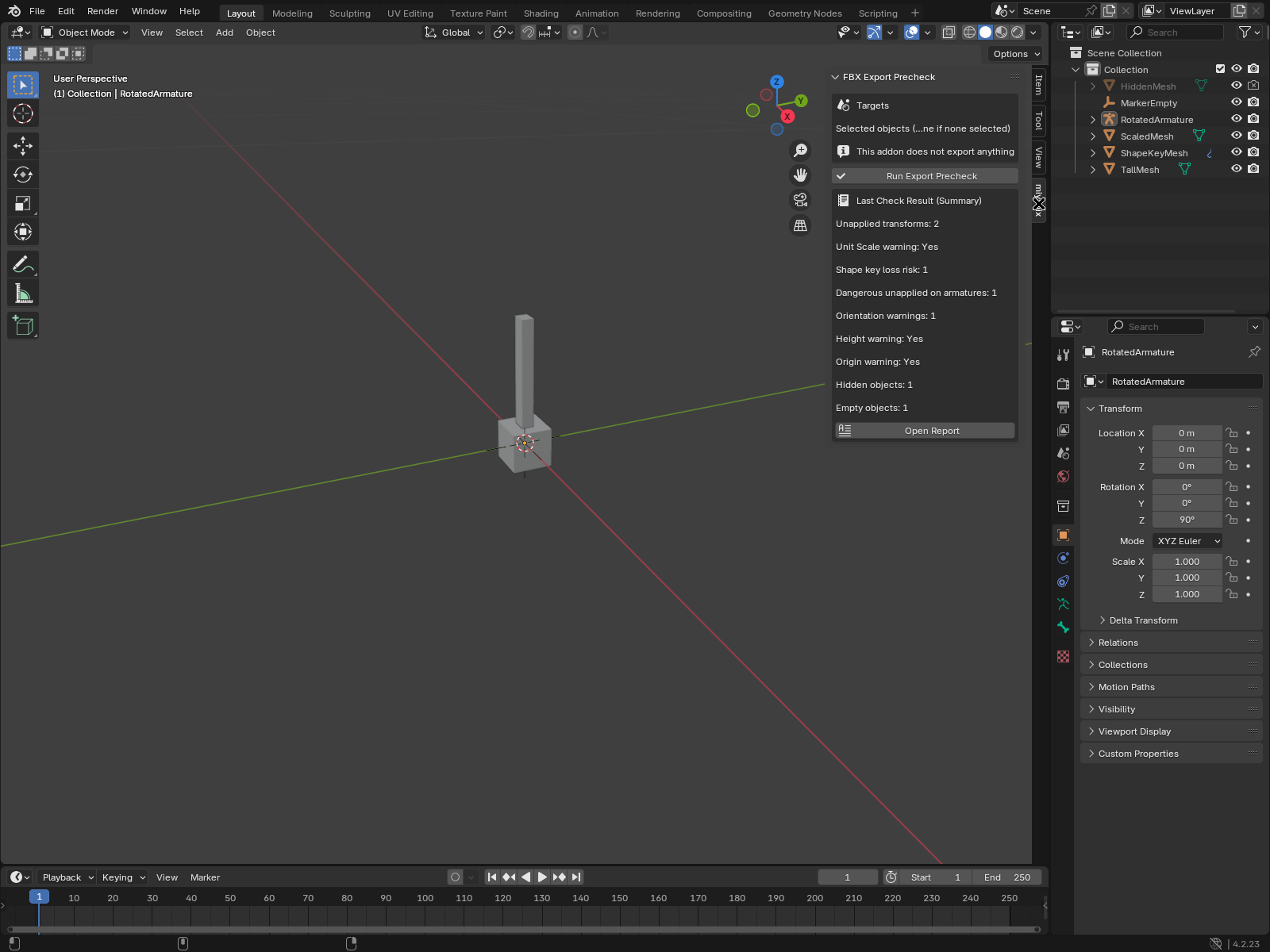
It looks PERFECT in Blender. Then you open it in Unity… and the scale is 100x. The rotation is off. The shape keys are gone. That sinking feeling — you already exported, already waited, already found out too late. FBX Export Precheck catches it BEFORE you export. It diagnoses the scene inside Blender and hands you the report: unapplied transforms, a Unit Scale that is not 1.0, shape-key loss risk, armature warnings, orientation and height guides, hidden and empty objects. Scan. Read the report. Then fix it — in Blender, before you export. Blender 4.2 or 5.3. $9.99. What it checks 1. Unapplied location / rotation / scale — lists Ctrl+A omissions for meshes and armatures 2. Scene Unit Scale — warns when Unit Scale is not 1.0 3. Shape key loss risk — warns when a mesh with shape keys has a modifier other than an Armature modifier (keys may be lost when modifiers are applied during FBX export) 4. Unapplied rotation / scale on armatures (stronger warning) — a dangerous combination that can break badly when combined with FBX Apply Transform style processing 5. Orientation / origin / height guide (warnings only) — estimates whether the front may not face -Y (from rotation), whether total height is far outside the avatar guide range (about 1.2–2.4 m), and whether the lowest point is off the ground (Z=0) 6. Hidden objects / empty objects — lists hidden objects and Empty objects in the scene Results are written to the "FBXPrecheck_Report" text block, with a summary shown in the panel. How to use Open the "miyabix" tab in the 3D Viewport sidebar (N key). Select the objects you want to check. If nothing is selected, all scene objects are checked. Press "Run Export Precheck". Read the summary counts in the panel and the details in the "FBXPrecheck_Report" text block. Note: check 6 always counts the whole scene. Notes and limitations This addon only diagnoses and reports. It does not export anything, and never modifies objects: it does not apply transforms, change or delete modifiers or objects, or change visibility or settings. The check 5 guide is based on rotation and the bounding box. The height guide assumes an avatar, so props and other non-avatar objects may produce warnings. Unit Scale and unapplied transforms may be intentional, depending on your export settings or workflow. The diagnosis is based on the structure at the time you run it. Run it again after making changes. If a problem occurs, try running it with other addons disabled to isolate conflicts. Works fully offline. No external libraries are used (only Blender's standard bpy and mathutils). Installation Install the .py file via Preferences > Add-ons > Install... and select the .py file, then enable the addon by checking its checkbox. A "miyabix" tab is added to the 3D Viewport sidebar (N key). System requirements Blender 4.2 or 5.3 (Windows / macOS / Linux — any environment where Blender runs) Files included - fbx_export_precheck.py — the Blender add-on - README.txt — English manual Refund policy For defects such as the addon failing to start, please contact the shop within 5 days of purchase with a detailed description of your operating conditions (Blender version, object structure, error messages, etc.). We will review the details and respond. Refunds cannot be accepted for requests outside the scope of use, or for behavior that matches the specifications.