![Branch and Bloom Horns — Horn Accessory with 8 Materials x 3 Reliefs (24 Looks) [VRChat/MA]](https://jinxxy-c.jinxxy-cdn.com/cdn-cgi/image/format=auto,onerror=redirect/84edb18f-0105-522b-ba9d-12ecceee5112/4012919197939008548/1034255197250567168.png)
![Branch and Bloom Horns — Horn Accessory with 8 Materials x 3 Reliefs (24 Looks) [VRChat/MA]](https://jinxxy-c.jinxxy-cdn.com/cdn-cgi/image/format=auto,onerror=redirect/84edb18f-0105-522b-ba9d-12ecceee5112/4012919197939008548/1034255238798298112.png)
![Branch and Bloom Horns — Horn Accessory with 8 Materials x 3 Reliefs (24 Looks) [VRChat/MA]](https://jinxxy-c.jinxxy-cdn.com/cdn-cgi/image/format=auto,onerror=redirect/84edb18f-0105-522b-ba9d-12ecceee5112/4012919197939008548/1034255247757446144.png)
![Branch and Bloom Horns — Horn Accessory with 8 Materials x 3 Reliefs (24 Looks) [VRChat/MA]](https://jinxxy-c.jinxxy-cdn.com/cdn-cgi/image/format=auto,onerror=redirect/84edb18f-0105-522b-ba9d-12ecceee5112/4012919197939008548/1034255263658298368.png)
![Branch and Bloom Horns — Horn Accessory with 8 Materials x 3 Reliefs (24 Looks) [VRChat/MA]](https://jinxxy-c.jinxxy-cdn.com/cdn-cgi/image/format=auto,onerror=redirect/84edb18f-0105-522b-ba9d-12ecceee5112/4012919197939008548/1034255270083840000.png)
![Branch and Bloom Horns — Horn Accessory with 8 Materials x 3 Reliefs (24 Looks) [VRChat/MA]](https://jinxxy-c.jinxxy-cdn.com/cdn-cgi/image/format=auto,onerror=redirect/84edb18f-0105-522b-ba9d-12ecceee5112/4012919197939008548/1034255275699768320.png)
![Branch and Bloom Horns — Horn Accessory with 8 Materials x 3 Reliefs (24 Looks) [VRChat/MA]](https://jinxxy-c.jinxxy-cdn.com/cdn-cgi/image/format=auto,onerror=redirect/84edb18f-0105-522b-ba9d-12ecceee5112/4012919197939008548/1034255317456449536.png)
![Branch and Bloom Horns — Horn Accessory with 8 Materials x 3 Reliefs (24 Looks) [VRChat/MA]](https://jinxxy-c.jinxxy-cdn.com/cdn-cgi/image/format=auto,onerror=redirect/84edb18f-0105-522b-ba9d-12ecceee5112/4012919197939008548/1034255329490640896.png)
![Branch and Bloom Horns — Horn Accessory with 8 Materials x 3 Reliefs (24 Looks) [VRChat/MA]](https://jinxxy-c.jinxxy-cdn.com/cdn-cgi/image/format=auto,onerror=redirect/84edb18f-0105-522b-ba9d-12ecceee5112/4012919197939008548/1034255335894789120.png)
![Branch and Bloom Horns — Horn Accessory with 8 Materials x 3 Reliefs (24 Looks) [VRChat/MA]](https://jinxxy-c.jinxxy-cdn.com/cdn-cgi/image/format=auto,onerror=redirect/84edb18f-0105-522b-ba9d-12ecceee5112/4012919197939008548/1034255347680962560.png)
![Branch and Bloom Horns — Horn Accessory with 8 Materials x 3 Reliefs (24 Looks) [VRChat/MA]](https://jinxxy-c.jinxxy-cdn.com/cdn-cgi/image/format=auto,onerror=redirect/84edb18f-0105-522b-ba9d-12ecceee5112/4012919197939008548/1034255353241494528.png)
![Branch and Bloom Horns — Horn Accessory with 8 Materials x 3 Reliefs (24 Looks) [VRChat/MA]](https://jinxxy-c.jinxxy-cdn.com/cdn-cgi/image/format=auto,onerror=redirect/84edb18f-0105-522b-ba9d-12ecceee5112/4012919197939008548/1034255394741805056.png)
![Branch and Bloom Horns — Horn Accessory with 8 Materials x 3 Reliefs (24 Looks) [VRChat/MA]](https://jinxxy-c.jinxxy-cdn.com/cdn-cgi/image/format=auto,onerror=redirect/84edb18f-0105-522b-ba9d-12ecceee5112/4012919197939008548/1034255400796962816.png)
![Branch and Bloom Horns — Horn Accessory with 8 Materials x 3 Reliefs (24 Looks) [VRChat/MA]](https://jinxxy-c.jinxxy-cdn.com/cdn-cgi/image/format=auto,onerror=redirect/84edb18f-0105-522b-ba9d-12ecceee5112/4012919197939008548/1033042754618387456.png)
![Branch and Bloom Horns — Horn Accessory with 8 Materials x 3 Reliefs (24 Looks) [VRChat/MA]](https://jinxxy-c.jinxxy-cdn.com/cdn-cgi/image/format=auto,onerror=redirect/84edb18f-0105-522b-ba9d-12ecceee5112/4012919197939008548/1033042772630222848.png)
![Branch and Bloom Horns — Horn Accessory with 8 Materials x 3 Reliefs (24 Looks) [VRChat/MA]](https://jinxxy-c.jinxxy-cdn.com/cdn-cgi/image/format=auto,onerror=redirect/84edb18f-0105-522b-ba9d-12ecceee5112/4012919197939008548/1033042791503794176.png)
![Branch and Bloom Horns — Horn Accessory with 8 Materials x 3 Reliefs (24 Looks) [VRChat/MA]](https://jinxxy-c.jinxxy-cdn.com/cdn-cgi/image/format=auto,onerror=redirect/84edb18f-0105-522b-ba9d-12ecceee5112/4012919197939008548/1033042806970237952.png)
![Branch and Bloom Horns — Horn Accessory with 8 Materials x 3 Reliefs (24 Looks) [VRChat/MA]](https://jinxxy-c.jinxxy-cdn.com/cdn-cgi/image/format=auto,onerror=redirect/84edb18f-0105-522b-ba9d-12ecceee5112/4012919197939008548/1033042825096047616.png)
![Branch and Bloom Horns — Horn Accessory with 8 Materials x 3 Reliefs (24 Looks) [VRChat/MA]](https://jinxxy-c.jinxxy-cdn.com/cdn-cgi/image/format=auto,onerror=redirect/84edb18f-0105-522b-ba9d-12ecceee5112/4012919197939008548/1033042844003065856.png)
![Branch and Bloom Horns — Horn Accessory with 8 Materials x 3 Reliefs (24 Looks) [VRChat/MA]](https://jinxxy-c.jinxxy-cdn.com/cdn-cgi/image/format=auto,onerror=redirect/84edb18f-0105-522b-ba9d-12ecceee5112/4012919197939008548/1033042859467724800.png)
![Branch and Bloom Horns — Horn Accessory with 8 Materials x 3 Reliefs (24 Looks) [VRChat/MA]](https://jinxxy-c.jinxxy-cdn.com/cdn-cgi/image/format=auto,onerror=redirect/84edb18f-0105-522b-ba9d-12ecceee5112/4012919197939008548/1033042886790753280.png)
![Branch and Bloom Horns — Horn Accessory with 8 Materials x 3 Reliefs (24 Looks) [VRChat/MA]](https://jinxxy-c.jinxxy-cdn.com/cdn-cgi/image/format=auto,onerror=redirect/84edb18f-0105-522b-ba9d-12ecceee5112/4012919197939008548/1033042909802292224.png)
![Branch and Bloom Horns — Horn Accessory with 8 Materials x 3 Reliefs (24 Looks) [VRChat/MA]](https://jinxxy-c.jinxxy-cdn.com/cdn-cgi/image/format=auto,onerror=redirect/84edb18f-0105-522b-ba9d-12ecceee5112/4012919197939008548/1033042927971086336.png)
Branch and Bloom Horns — Horn Accessory with 8 Materials x 3 Reliefs (24 Looks) [VRChat/MA]
Etiquetas
Descripción del producto
Este producto contiene contenido generado por IA.
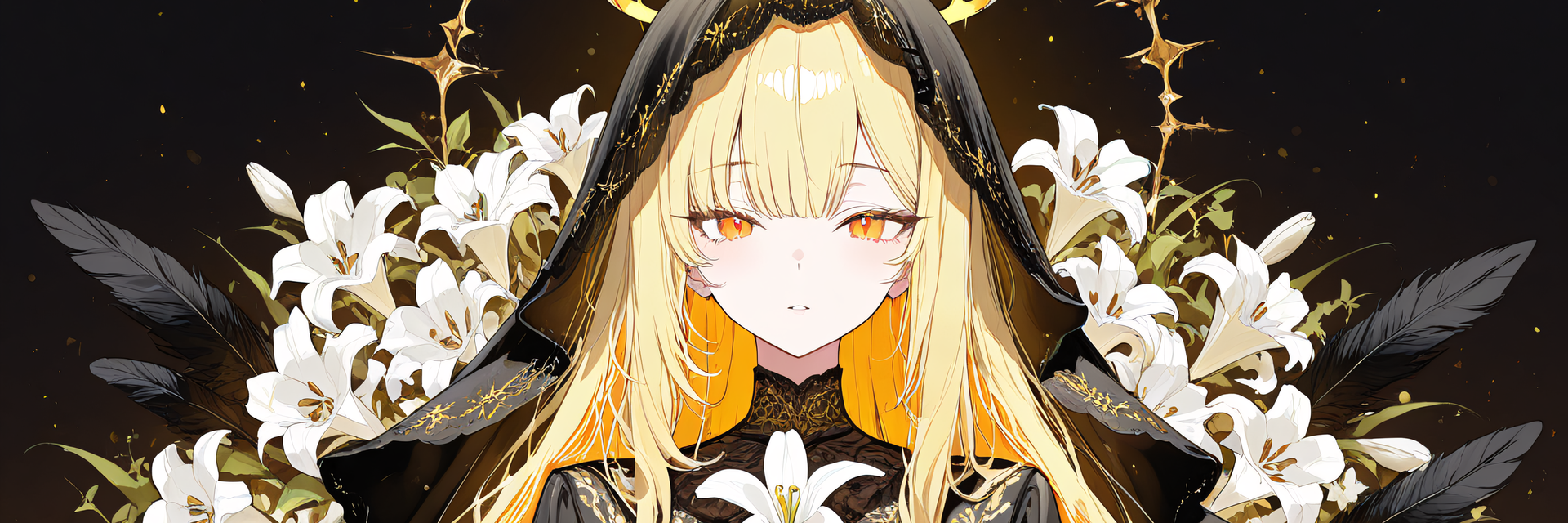
Pick from 8 materials x 3 reliefs = 24 looks in the Action Menu! A pair of horns growing from the temples, wrapped in black branches and red flowers (VRChat / Modular Avatar). Show left only or right only, too.
To change colors, the free "ys-room Color Tool" (for ys-room products only) is needed. Without it, the product works as-is with its default colors (the in-game menu options such as material work without the tool).
ys-room Color Tool (free): https://jinxxy.com/Ys_room/8xXmh
Note: The character (avatar) shown in the product images is not included.
[Product] Branch and Bloom Horns
A horn-style head accessory for VRChat: a pair of horns growing from the temples, wrapped with black branches, red flowers, vines and hanging ornaments. Pick the horn's material from 8 kinds and its surface relief from 3 kinds in the Action Menu (24 combinations).
It supports Modular Avatar: just drop the prefab under your avatar and it attaches to the head.
What it does
- 8 materials (pick one in the menu "Material"; default Plum): changes color, gloss and metal feel of the horn body and the red tips (blades). Flowers, branches, vines and ornaments stay the same
Plum (low gloss) / Black horn (matte) / Obsidian / Aged metal (verdigris) / Purple crystal / Wood-grain horn / Veined dark red horn / White bone - 3 reliefs (pick one in the menu "Relief"; default Scales): changes the surface pattern (normal map) of the horn body. The shape (triangles) does not change
Scales: angular polygonal plates packed together with thin valleys between them, like lizard skin
Grooves: vertical grooves running along the length of the horn
Crystal facets: large faceted planes, like a crystal - Show (pick one in the menu "Show"; default Both): Both / Left only / Right only / Hide both
- Material x relief = 24 combinations. Including Show, all 96 combinations were checked by actually switching them in Unity (see "Verification" below)
- For those who do not want menu items, 8 single prefabs (one per material; no menu, no synced parameters) are included (relief = Scales)
- A symmetric pair. Position and size defaults are the values decided on our mascot avatar
- No motion (no transformation, sway or glow animation). The flowers and the red tips are static emission textures
- Your choice is saved and synced to other players
Changing colors (free ys-room Color Tool, a separate download)
- To change colors, add the free "ys-room Color Tool" (for ys-room products only; Color Tool 1.0.0 or later). It is not included in this product. Without it, the default colors (plum, pink flowers, red crystal) are used as-is
- What the tool can change: horn body color / flower color (branches and vines follow in a darker tone) / red crystal color / glow of crystals and flowers (color and brightness). 12 presets included (Sakura and ice, Golden bloom, Jade, Wisteria and moon, and more)
- After you choose colors, the material / relief / show menus still work (the colors stay as you chose)
- The "Change the Colors" picture in the product images shows the product with the ys-room Color Tool installed
- How to install and use the tool: see the included Readme and the tool's own page
- ys-room Color Tool (free): https://jinxxy.com/Ys_room/8xXmh
How the combinations look (checked by rendering all 24 in Unity)
- Reliefs are easiest to see on Plum, Black horn, Vein and White bone
- On Wood-grain all three reliefs are subtle. On Purple crystal the crystal pattern of the material is strong, so no relief stands out
- On Obsidian and Aged metal the material's own speckles and the relief overlap and look a little busy (especially Scales)
- The relief is a normal map, so it is hard to see in dim worlds (almost invisible in dark worlds; the shape and the glow of the flowers and red crystals still read)
Quick start
- Add Modular Avatar and lilToon to your project in VCC, then import the included unitypackage
- Drag YsHornBF_AllInOne.prefab onto your avatar's name in the Hierarchy (it should end up one level under the avatar). In the Scene view the horns appear near the feet; they attach to the head on build / play
- Check with Build & Test, then upload. "Branch and Bloom Horns" is added to your Action Menu
- To change colors, install the ys-room Color Tool and follow "Changing colors" in the included Readme
- To use Grooves or Crystal facets on a single prefab, swap the materials (the name table is in the included Readme)
Menu
Branch and Bloom Horns > Material (8) / Relief (3) / Show (4)
- Synced parameters: 3 Ints, 24 bits in total. A warning appears if your avatar has no room for parameters
- 2 layers are added to FX (both Write Defaults off)
Verification (what was checked on a real VRChat client and what was not)
[Checked on a real VRChat client] None. It has not been tested on a real VRChat client yet.
[Checked in Unity] We imported this unitypackage into a clean project (VRChat SDK, Modular Avatar and lilToon only), the same setup as buyers, and checked the following.
- Imported without the color tool (16 checks passed, 0 failed): 0 compile errors / it imports fine without any color tool / prefabs load / 0 broken texture references on the 24 materials and all 102 prefab dependencies exist / materials are lilToon / no .cs or .dll inside / 0 errors, warnings and info in NDMF (the Modular Avatar build preprocessing) / the horn materials after the build are the product's own originals
- With ys-room Color Tool 1.0.0 added afterwards (22 checks passed, 0 failed): the tool finds the placed horns as a target / pressing all 12 presets and reading the colors back matches the expected values (96/96) / custom colors are saved and read back / 0 NDMF issues on an avatar with chosen colors / "Restore original" restores the original materials / when a product asks for a newer tool, a warning appears and applying is stopped
- Face orientation of the horn models: both sides face outward (outward ratio 0.98 and 0.975; machine check). We rendered the horns worn on our mascot from the front, back, back-angled, side and top in Unity and checked by eye that no holes or flipped faces appear (also checked with back-face culling on)
- Every menu item (material 8, relief 3, show 4) and every combination (8 x 3 x 4 = 96): the materials and left / right visibility come out as expected. This was checked on the version before the face-orientation fix of the horn models (materials, animations, FX and menu are identical to this product)
- Versions checked (others untested): Unity 2022.3.22f1 / VRChat SDK Avatars 3.10.4 / Modular Avatar 1.18.7 / lilToon 2.3.4
[Known] On avatars with 2 FX layers, the SDK Build panel may show a "mixed Write Defaults" warning (it comes from the dummy layer [Write Defaults on] that Modular Avatar adds for MMD worlds. All layers of this product use Write Defaults off, and on an avatar with 3 or more FX layers there were 0 warnings)
[Not checked]
- The look and feel on a real VRChat client, and on other players' screens (sync)
- The horn position on your own avatar (interference with hair and head shape; adjustable)
- The look and mouse operation of the ys-room Color Tool window (the logic behind the window was checked)
- Quest / Android (not supported)
Requirements
- Unity 2022.3 series / VRChat SDK Avatars 3.10 or later / Modular Avatar 1.18 or later / lilToon 2.3 or later
- PC only (not supported on Quest / Android). A Humanoid avatar set up for VRChat is required
Performance (the horn prefab alone, VRChat SDK stats in Unity, PC)
Triangles 19,320 (9,660 per side) / meshes 2 / skinned meshes 0, bones 0 / material slots 2 (one per side; there are 24 materials but only one per side is used at a time) / particles 0 / PhysBone, Contact 0 / synced parameters 24 bits / FX layers 2
- PC rank: Excellent overall for the horn prefab alone (polygons, materials, meshes, textures and particles are all Excellent)
- Textures: the ones loaded first (Plum + Scales) are 10.4 MB. All textures in the folder (every material and relief, plus 12 light-and-dark pictures used when you change colors) total 38.7 MB (51 textures). With the ys-room Color Tool's colors applied, what is loaded first becomes 11.7 MB. The SDK rank counts only the material loaded first, but the textures for switching are also inside your avatar
- * Mind the total on your avatar: 19,320 triangles is more than our other horns and crowns. On our mascot (no horns: 50,928 triangles, Poor) the total becomes 70,248 triangles, which is VeryPoor (over 70,000). On an avatar that already has many triangles, the overall rank can drop
- Not measured on a real VRChat client
Included
- ys_horn_branchflower.unitypackage (all-in-one prefab, 8 single prefabs, models, 24 materials, 3 normal maps, FX, menu). The color tool is not included
- Readme_JP.txt / Readme_EN.txt, License_JP.txt / License_EN.txt, Changelog_JP.txt / Changelog_EN.txt
Notes
- Do NOT place the all-in-one prefab and a single prefab on the same avatar (two pairs of horns would overlap)
- The material change affects only the horn body and the red tips. The colors of flowers, branches, vines and ornaments do not change (the ys-room Color Tool can set them)
- The default position fits our showcase character. On other avatars the horns may float or sink, and depending on the hairstyle the roots may be hidden in the hair (adjust Position / Rotation / Scale of the prefab)
- The SDK Build panel may show a "Write Defaults mixed" warning on avatars with 2 FX layers (caused by the MMD layer that Modular Avatar adds; it does not appear on avatars with 3 or more FX layers). The layers of this product use Write Defaults off
How it was made
- The horn shapes were refined by us in Blender, based on drafts and 3D shapes made with generative AI (image generation and 3D generation). The textures for material, relief and color were created by us with programs
Terms of use (summary)
- Modifications are allowed / you may build it into your own avatar and upload it to VRChat
- Redistribution is prohibited (as-is or modified; including distributing or selling it inside avatar data)
- See the included "License_EN.txt"
Changelog
- 2026-10-24: First release (8 materials, 3 reliefs, Action Menu, left / right only, single prefabs. To change colors, add the free ys-room Color Tool separately)