
Descripción del producto
Este producto contiene contenido generado por IA.
AI-Assisted: the 3D shapes, materials, shaders and listing texts were made with scripts written with AI assistance. A person checked how it looks and moves in Unity before release.
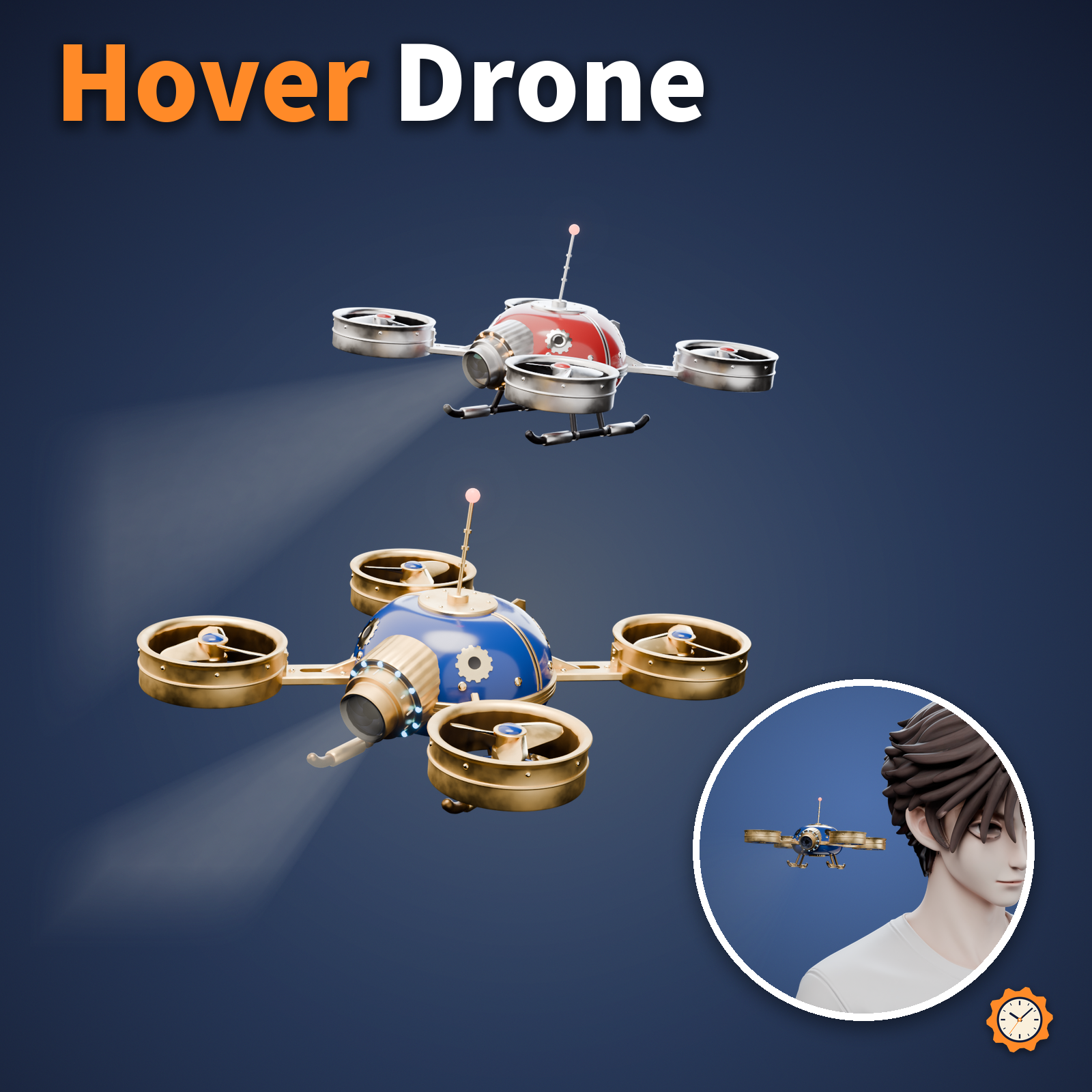
A small clockwork drone made of brass and enamel. It floats beside your shoulder, spinning its 4 propellers and slowly bobbing up and down.
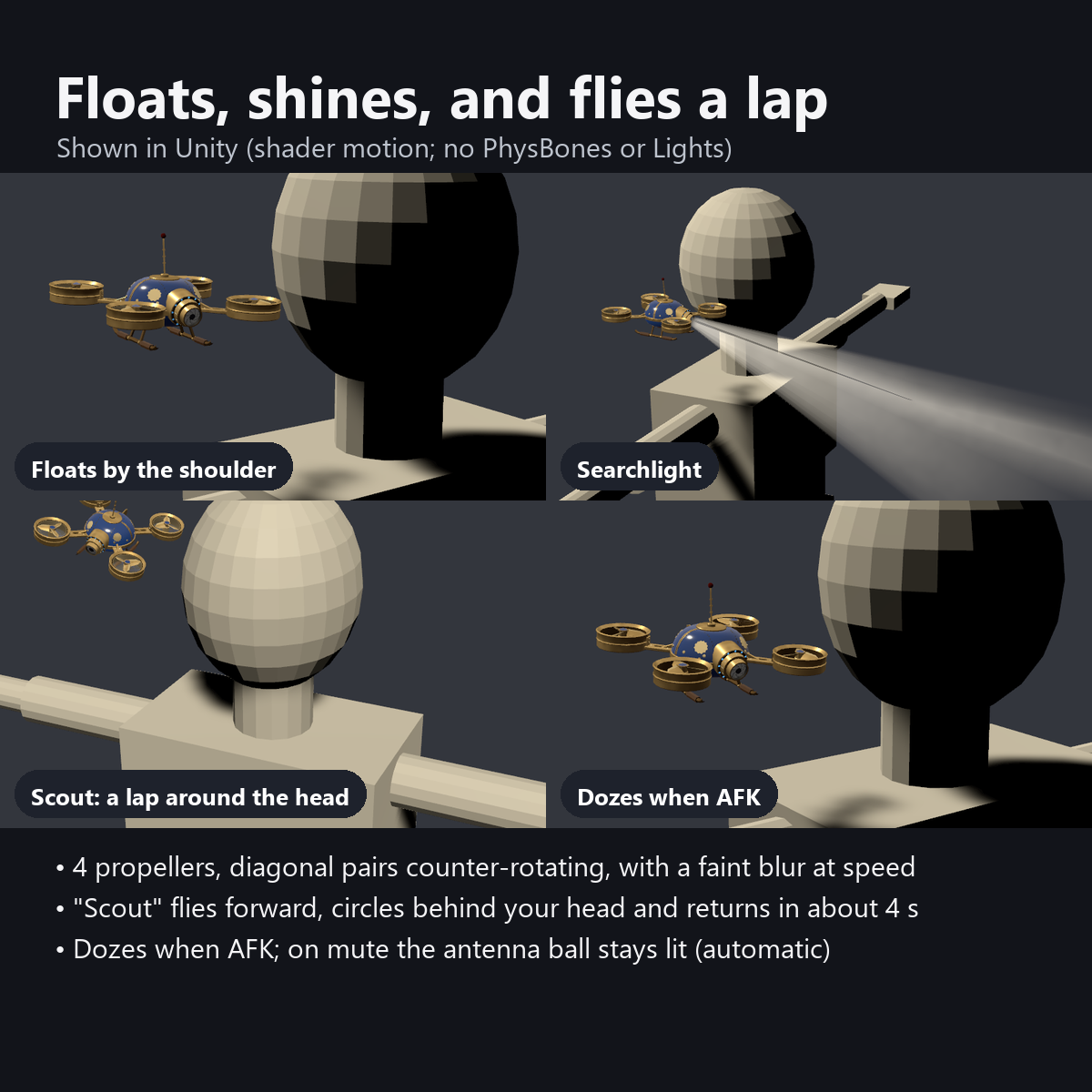
"Searchlight" in the menu shines a cone of light from the lens on its front. Press "Scout" and it flies forward, circles once around your head, and comes back beside your shoulder (about 4 seconds).
Now and then it looks around left and right. When you go AFK, it slows its propellers, sinks a little and starts to doze.
Features
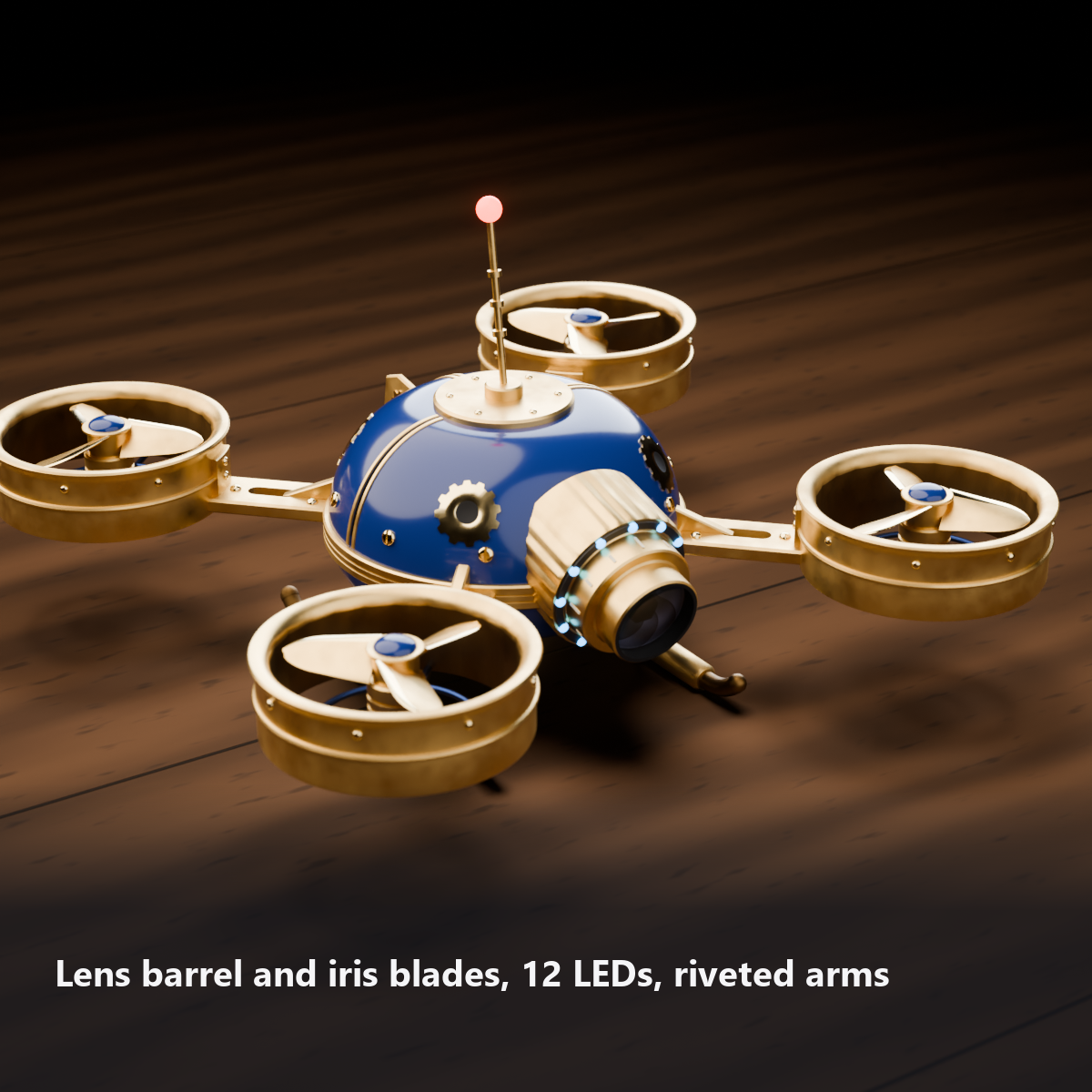
- 4 propellers that really spin: diagonal pairs turn the same way and neighbors turn the opposite way, like a real quadcopter. Inside each flared duct: a 3-blade propeller with a brass washer and an enamel cap, a motor, and a grille underneath
- "Scout" circles your head and comes back (about 4 seconds): it moves forward, leans inward as it passes behind your head, rises a little and returns. The propellers and LEDs speed up during the flight
- "Searchlight": a cone of light from the lens that fades toward the end (an additive plane, not a real Light, so it is light). No hard edge lines, and dust drifts slowly through it. In VRChat it is only the look of a cone; it does not light up the floor
- Hovering: bobbing, small tilts, and looking left and right now and then (decorative motion with no sync)
- Dozes when you are AFK: the propellers drop to 1/4 speed, it sinks 12 mm and looks down, the LEDs breathe slowly, and the red ball on the antenna goes dark
- Mute indicator: while you are muted, the red ball on the antenna stops blinking and stays lit
- 4 LED colors: blue / green / orange / red. A light travels around the 12 LEDs one at a time
- Music: in AudioLink worlds, the LEDs and the blur edges glow with the bass, and the leading edges of the blades glow with the treble
- Attach To in the menu: right shoulder / left shoulder / above head (above the head it circles over your head while moving outward)
- Craft details: enamel shells with brass-trimmed vertical seams, small brass pan-head screws, inlaid gears on each panel, engraved lines on the brass bands, riveted arms with slots and triangular gussets, beaded and riveted ducts, a stepped lens barrel (knurled knob, ivory scale) with a 7-blade iris, 12 LEDs, leather pads on the skids, a coiled antenna, and a tail fin with the gear mark
- No reset needed, never drifts: it is not a world-following pet but is attached to your body and floated by a shader, so it does not lag behind or end up in a different place in every photo
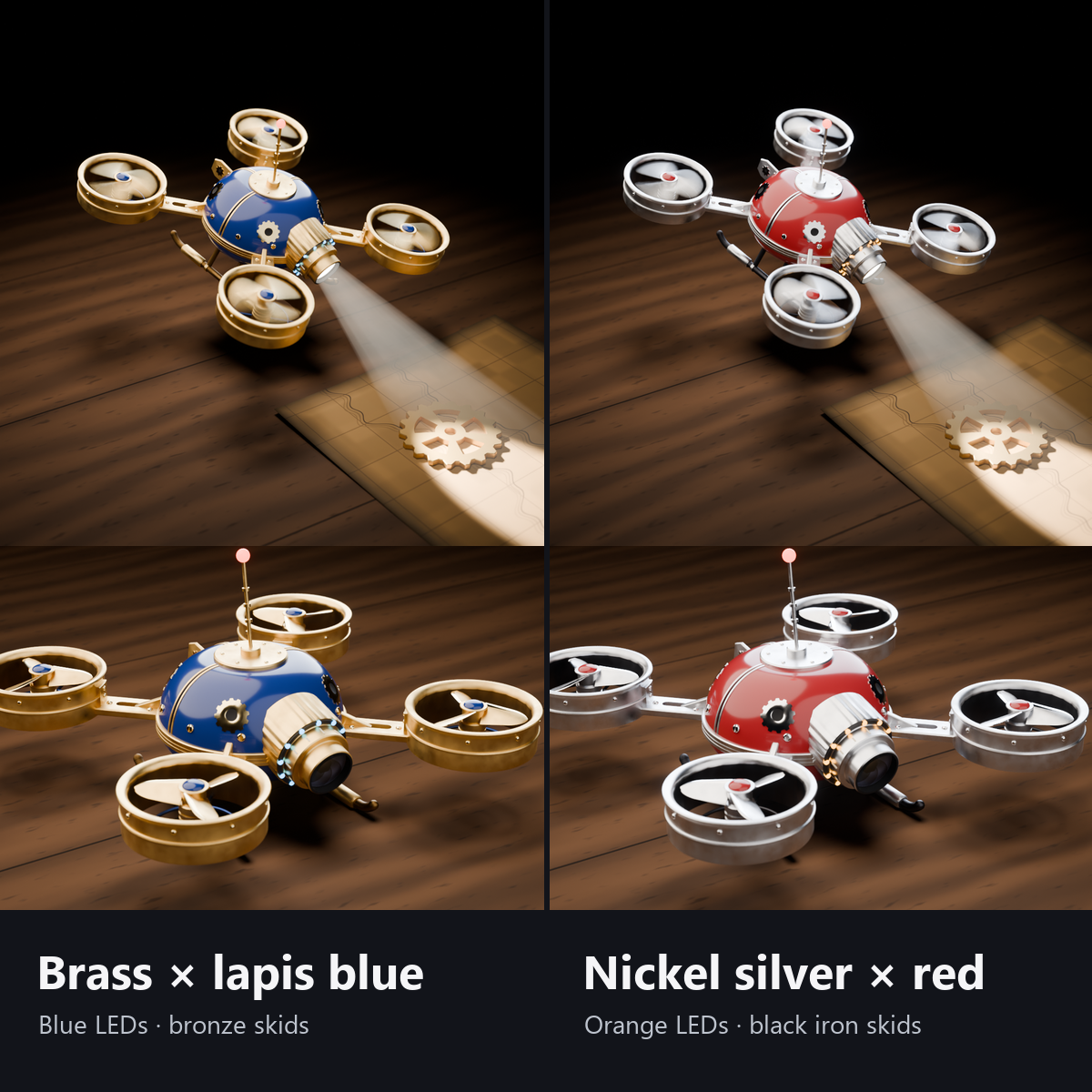
- 2 colors, both included: brass with lapis blue enamel (blue LEDs) / nickel silver with vermilion enamel (orange LEDs)
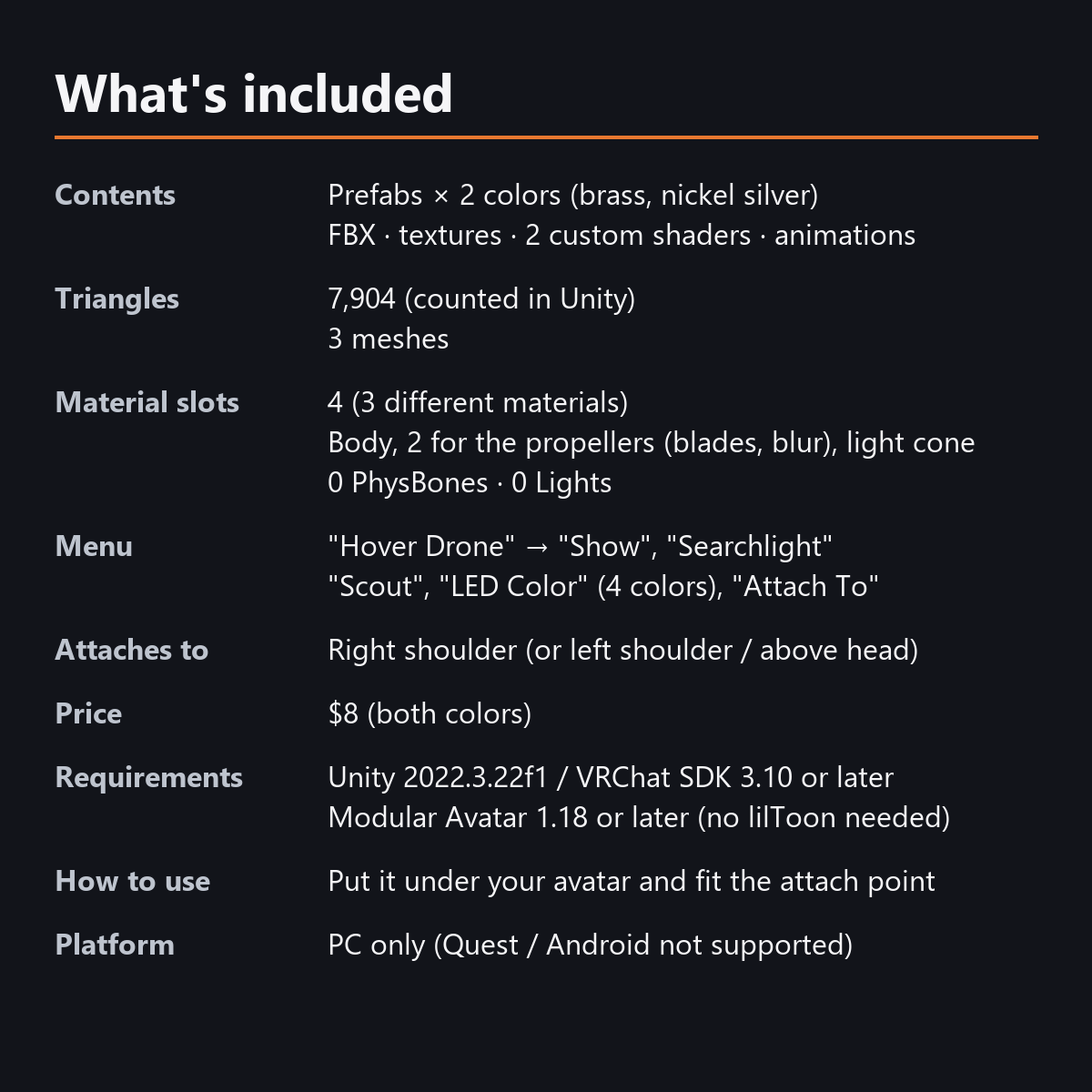
- Load: 7,904 triangles, 3 meshes, 4 material slots, 0 PhysBones, 0 particles, 0 Lights (what it adds to your avatar, counted in Unity). All motion is shaders and animations
- Custom shaders included (no lilToon needed). All designs are original
- Modular Avatar ready: put it under your avatar and move the anchors to the height above the center of your head
How it works
- The propellers turn 4 times per second (3 blades, so they look smooth). The angle does not jump when the speed changes (for example when it slows down while AFK). The faster they spin, the more a faint blur disc appears inside the ducts.
- "Scout" turns an invisible axis on your body once in 4 seconds, leaning the drone forward and inward and lifting it slightly. On the left shoulder the motion is mirrored, so it always flies forward first from either shoulder.
- The hovering, looking around, the traveling LED light and the antenna blink are moved by the shader using the time (no sync).
- All motion is vertex shaders and Transforms, with no bones, PhysBones, particles or Lights.
What to know before buying
- It is not a world-following pet that walks around the room behind you. It is a companion that floats beside your shoulder (or above your head).
- The searchlight is the look of a cone of light. In VRChat it does not light up the floor or walls (the bright spot on the stand in the first image is the photo lighting).
- The default anchor positions are for an avatar about 1.45 m tall. Move the anchors to fit your avatar (the manual explains how).
- For chibi avatars, a Scale of about 0.7 on the drone (HoverDrone_*_Model) gives a good size.
Menu (English menu prefab)
- Hover Drone > Show: drone on/off
- Hover Drone > Searchlight: cone of light on/off (OFF at first)
- Hover Drone > Scout: press to fly once around your head and come back (about 4 seconds)
- Hover Drone > LED Color: Blue / Green / Orange / Red (the nickel silver version starts with Orange)
- Hover Drone > Attach To: Right Shoulder / Left Shoulder / Above Head (Right Shoulder at first)
What's included
- Prefabs x 2 colors (brass, nickel silver)
- FBX, textures (color swatches), 2 custom shaders (body, light plane) and a shared include file, animations
- English-menu prefabs (_EN) next to the Japanese-menu prefabs. Use one or the other on an avatar, not both.
- Instruction manual and Terms of Use in English and Japanese
Specs
- Added to your avatar (counted in Unity): 7,904 triangles, 3 meshes, 4 material slots (3 kinds of material), 0 PhysBones
- Synced parameters: 21 bits (Show, Searchlight, Scout, LED Color, Attach To, AFK, mute)
- All counts follow VRChat's rules (hidden parts are counted too) and show how much one prefab adds to your avatar.
- The VRChat performance rank depends on the total with your avatar, so this item alone does not decide it.
- No PhysBones, particles, Lights, AudioSources or Contacts
- Size: about 13 cm wide (to the outside of the ducts), about 8 cm tall (skids to antenna ball). It floats beside your shoulder, a little larger than a fist
- No extra skinned mesh
Requirements
- Unity 2022.3.22f1 (an avatar project made with VRChat Creator Companion)
- VRChat SDK (Avatars) 3.10 or later
- Modular Avatar 1.18 or later
- lilToon is not needed (custom shaders included)
Please note
- PC only. Not supported on Quest / Android.
- The Scout motion plays on each viewer's device, so it may be slightly out of step for some viewers.
- AFK dozing starts when VRChat decides you are AFK (we have not confirmed when the desktop version sets AFK).
- In the Unity editor it is shown standing still (it moves in VRChat and in Play mode).
- If a viewer's Safety settings hide shaders, the drone is shown standing still, and the searchlight and propeller blur are hidden.
- There is no sound (opinions on propeller sounds differ).
- It does not copy the shape of any real brand or existing work (all shapes, patterns and marks are original).
- The menu controls (Show, Searchlight, Scout, LED Color, Attach To), the propellers, the hovering and the AFK / mute reactions: they move only inside VRChat (including Build & Test) or with Gesture Manager. If they look still in the Unity Editor, nothing is broken.
Terms of use
- You may upload it to VRChat and similar services on your own avatars, edit it, and use it in streams, videos and photos (commercial or not).
- You may not redistribute, resell or share the data (edited or not), or use it to train AI.
- Full text: TermsOfUse_EN.txt in the download (Japanese original: TermsOfUse_JA.txt).
How this was made (AI-Assisted)
The 3D shapes, materials, shaders and texts of this item were made with scripts written with AI assistance. A person checked how it looks and moves in Unity before release.